
Teamfight Tactics Overlay Guide
If you’re here reading this, there’s a good chance you’ve been coming to our blog or site to improve your TFT game with resources like our meta team comps or tier lists for champions and items.
We’re excited to announce that now you’ll be able to access all these expert insights and recommendations directly within your game client with our new TFT overlay.
It’s automatic, easy to use, and you can even customize it according to your preferences.
In this guide, we’ll show you how to get the overlay and get the most out of its features.
How to Get the Overlay
If you already have the most recent version of the Mobalytics Desktop App, you’re good to go!
Just jump into a TFT game and it’ll instantly activate for you.
For everyone else, you can download the overlay for PC or Mac by heading to this link.
It’s free, takes a second to install, and it’s compliant with Riot’s Terms of Service if you think it’s too OP.
Overlay Features
Everyone’s different and will find different widgets within our overlay to be useful depending on their individual skill level.
Here’s a general flow that will show off everything that it can do – find out what works best for you!
Meta Team Comp Targeting
The overlay will automatically activate and display as soon as your lobby begins to load.
This is a great time to take a look through all the best team comps in the meta.

If you’re new to Mobalytics, these team comps are curated by our panel of high ELO experts.
As soon as you click a team comp, all the widgets you see will transform to guide you toward playing the comp optimally.

In most cases, you’ll usually want to wait to choose your team comp after seeing what early units and item components you’re working with in terms of the first carousel and PvE rounds.
For the purposes of this guide, we’ve targeted the Bed & Breakfast comp.

If you see that a lot of people are targeting the same comp as you, you can change your set comp at any time (just make sure to pivot before it’s too late).
Strategic Gameplan
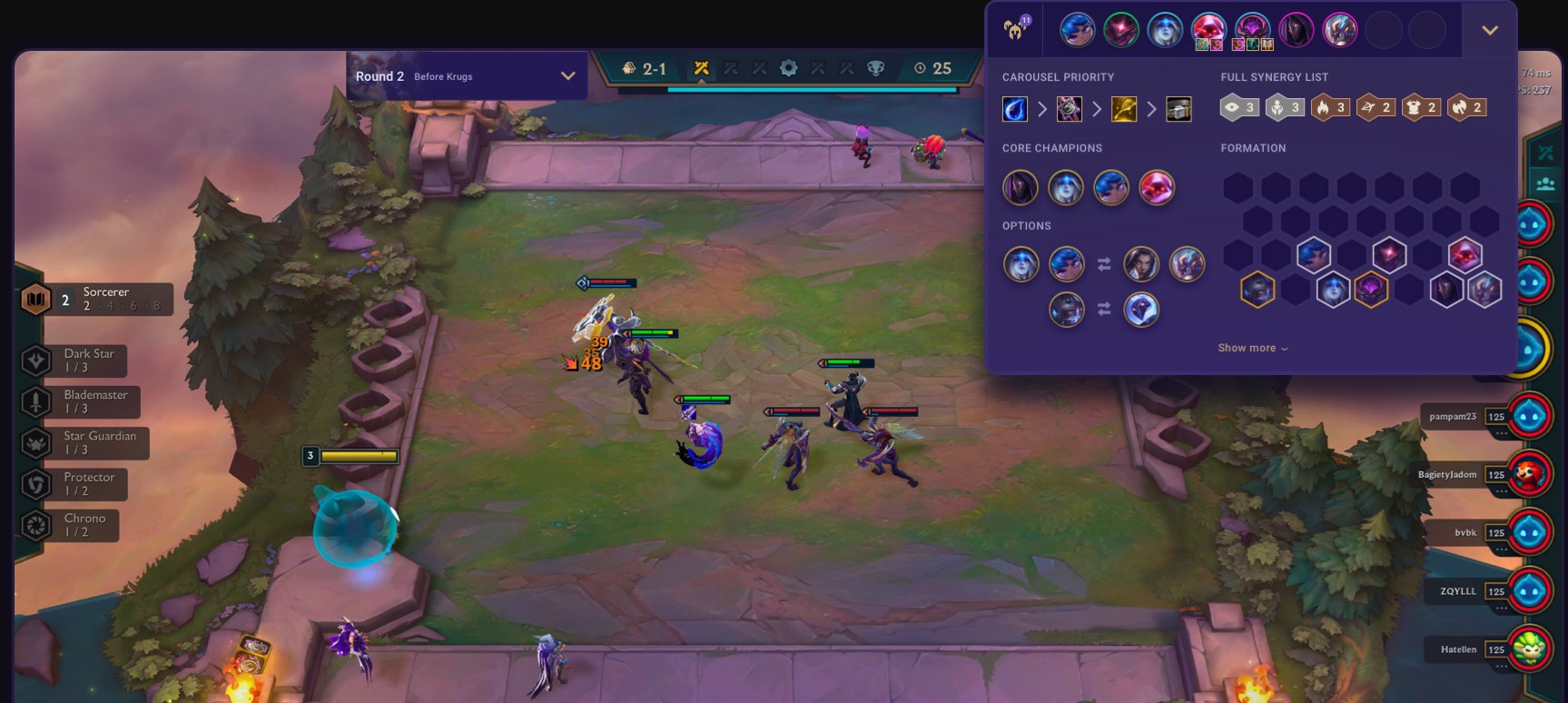
After selecting a team comp, the widget at the top right corner of your screen will help you execute your team comp’s strategy from the beginning of the game to its end.

Here you’ll find a suggested positioning for your end game formation as well as other insights related to your champs and items.
Think of these recommendations as your North Star to guide you and play the team comp as optimally as possible.
Carousel Priority
Ever wonder which item components you should be targeting at carousel rounds?
The Carousel Priority section of your gameplan not only recommends which items you should be making your Little Legend chase, but also prioritizes them by importance.

Here you can see that Bed & Breakfast wants Recurve Bow, B.F. Sword, and Chain Vest in that order.

At the bottom left, you can see that these components help you build toward multiple recommended core items, such as Giant Slayer (B.F. Sword + Recurve Bow) and Guardian Angel (B.F Sword + Chain Vest).
Options (Alternative units)
If you’ve played enough TFT, you know that things often don’t go according to plan, and sometimes you’ll have to adjust on the fly.
Luckily, certain champions and champion combinations can usually fill in a similar purpose or niche as others.
The Options section of your gameplan offers alternative substitutes for these types of situations.

Here we can see that if you’re unable to get Gangplank + Ziggs, you can also use the pairs of Lucian + Ezreal or Sona + Lulu and still be able to execute your strategy.
If you don’t recognize a champion by their icon, you can hover them here or in the formation section to reveal more information.

Early and Mid Game Strategies
By clicking “Show more” below the formation, you’ll reveal suggested early and mid game setups for your team comp.
As a reference for newer players, for most TFT matches, early game is usually around when players have around four units and mid game begins around when players reach around six.

Since certain comps don’t fully form until later in a game, this will help you transition as smoothly as possible toward your end game comp.

Often times, you may just be trying to survive and build your economy before reaching a particular breakpoint and then finding what you need.
For Bed and Breakfast’s early game, we’re looking for early Brawlers to be our beefy frontline while we collect the rest of our units.
Since we won’t find Jinx and Miss Fortune until much later, we can use other carries like Lucian and Ezreal in the meantime.

In the image above, you can see that although we weren’t able to find the exact combination of what was suggested, we’re still able to use the same framework of having a frontline protecting a backline carry.
As we transition to mid game, you can see that we’re getting closer and closer to what we’re aiming for as the game goes on.

Remember that your early and mid game substitutes can hold onto your items until you find your late game carries.
As soon as we find Jinx, we can sell Lucian and transfer his items to their intended owner.

Leveling Guide
A core fundamental for executing any TFT team comp is understanding how you should be managing your economy and experience.
Should you hyperoll to build momentum early? Or greed for econ and then roll down later on?
The widget at the top left of the overlay is specifically designed to help you do that.

The Leveling Guide includes various sections that you can click through based on the specific stage rounds of your match, using the PvE rounds as reference points.

If you’re ever wondering which PvE camp is coming up next, just hover the icon to the left of your timer (as shown below).

Again, remember that although these are best practices suggested by our experts, they are guidelines and not laws, and largely rely on you being able to recognize the context of your match.

For example, if you’re taking more damage than expected and getting close to the danger zone, don’t sit on a big pile of money until you die.
Use that money to stabilize and then return to your original gameplan once you’re back on your feet.
To learn more about these sort of fundamental skills, we strongly recommend checking out our TFT Economy Guide.
Items: Cheat Sheet and Recommendations
As we mentioned earlier, the bottom left widget displays the items we recommend targeting for your team comp’s core carries.
If you haven’t decided on a comp yet or have other item components than the ones you’re looking for, you can also switch it to being a handy recipe cheat sheet.

Similar to champion icons within our overlay, you can hover over any item icon to bring up more info.
Customize your experience
The last major feature we want to highlight is your ability to customize the overlay to your personal preferences.

Within your settings, you can find toggles that show or hide any of the previous widgets we mentioned.
You can also set a favorite team comp that you want to target by default at the beginning of your future matches.
Lastly, we know that players will have various screen sizes. By using the slider, you can stretch or shrink the overlay to find the right fit for you.

Conclusion
So there you have it! We’ve been working hard on this for a while so we’re glad you can finally play with it.
This is just the first version and we plan to add more tools to it over time, so please do give us your feedback so we can make it as best as possible.
Remember that if the overlay is a sword, you are the swordsman.
It is a tool that will help you play optimally but it won’t be able to do everything to make you win without having an understanding of the fundamentals of TFT.
If you want to improve your game knowledge, we recommend checking out:
- How to Manage your Teamfight Tactics Economy (Three Fundamental Strategies)
- How to Adapt to Meta Shifts in TFT (Grandmaster Tips + Analysis)
- How to Play from Behind in TFT
- How to Improve your Scouting in TFT
- TFT Positioning Guide: How to Get the Most from Your Units
- 10 Ways to Improve your Mentality in Ranked TFT
To learn about the latest TFT Set 6, head to our all-in-one Teamfight Tactics Set 6 reveal page that covers all champions, synergies, and more!
